
Goal
Evolve the Intuit Expert Portal (IEP) from a static, manual platform that doesn't hold everything an expert needs into an AI-native one where the work comes to the expert instead of the expert going to find it, so experts spend less time navigating and more time with the customer.
My Impact
As a design lead on the end-to-end DFY experience, I took IEP's expert workspace from its baseline third-peak state to its next iteration. My contribution was the "plus": a provocation called Dynamic Workflow Cards, where the actions an expert needs are served up as cards right in their workflow, surfaced in real time by what the customer is saying, instead of the expert leaving to go find a separate tool. My designs didn't ship verbatim, but the direction moved the roadmap and fed the iterations of AI Native IEP that followed.
What I delivered
Dynamic Workflow Cards, a provocation collapsing tools and actions into real-time, conversation-driven cards
End-to-end flows across three scenarios, designed to hold up even when AI guidance is weak
A roadmap-moving direction presented to cross-functional partners and carried into later iterations
AI Native IEP: Reimagining the Expert Workspace
Portfolio type
Project
Project timeline
Jul 2025 - Sep 2025
Sector
Fintech, Enterprise
Role
E2E lead on Product design, Service design, Design system
Platform
Responsive Web App
Empathize
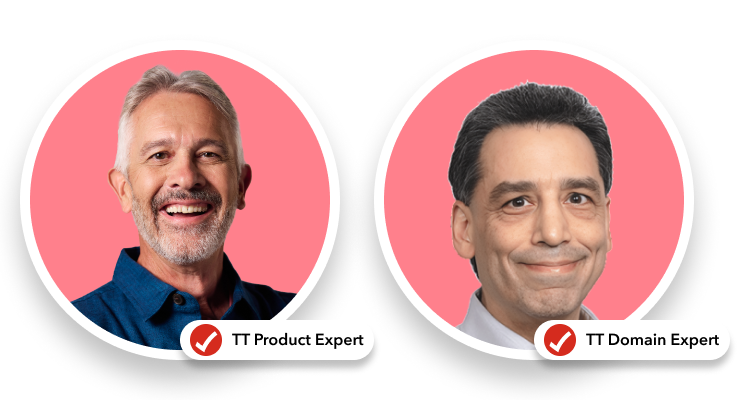
What is an IEP expert?
Before this work, IEP was a static, manual platform that didn't hold everything experts needed, so they worked across it and a patchwork of outside tools. Experts spent a real share of every call on navigation and wayfinding instead of the customer in front of them:
Product Support experts who help customers with product, account, and technical issues.
Domain experts (CPAs and bookkeepers) who provide tax and accounting expertise.
The problem: experts fight their software
Before this work, IEP was a suite of disparate tools layered together over years. Experts spent a real share of every call on navigation and wayfinding instead of the customer in front of them.
Swivel-chair and glitches. Domain experts kept around 7 tools open to support a single call, and experts reported clearing cache and cookies an average of 2.7 times a day just to keep IEP working.
Inefficient context. With no unified view, experts spent time gathering and digesting information before they could even understand the customer’s situation.
Static guidance. Intuit Assist sat in a fixed side panel. Guidance, navigation, and workflow were three separate things the expert had to stitch together themselves.
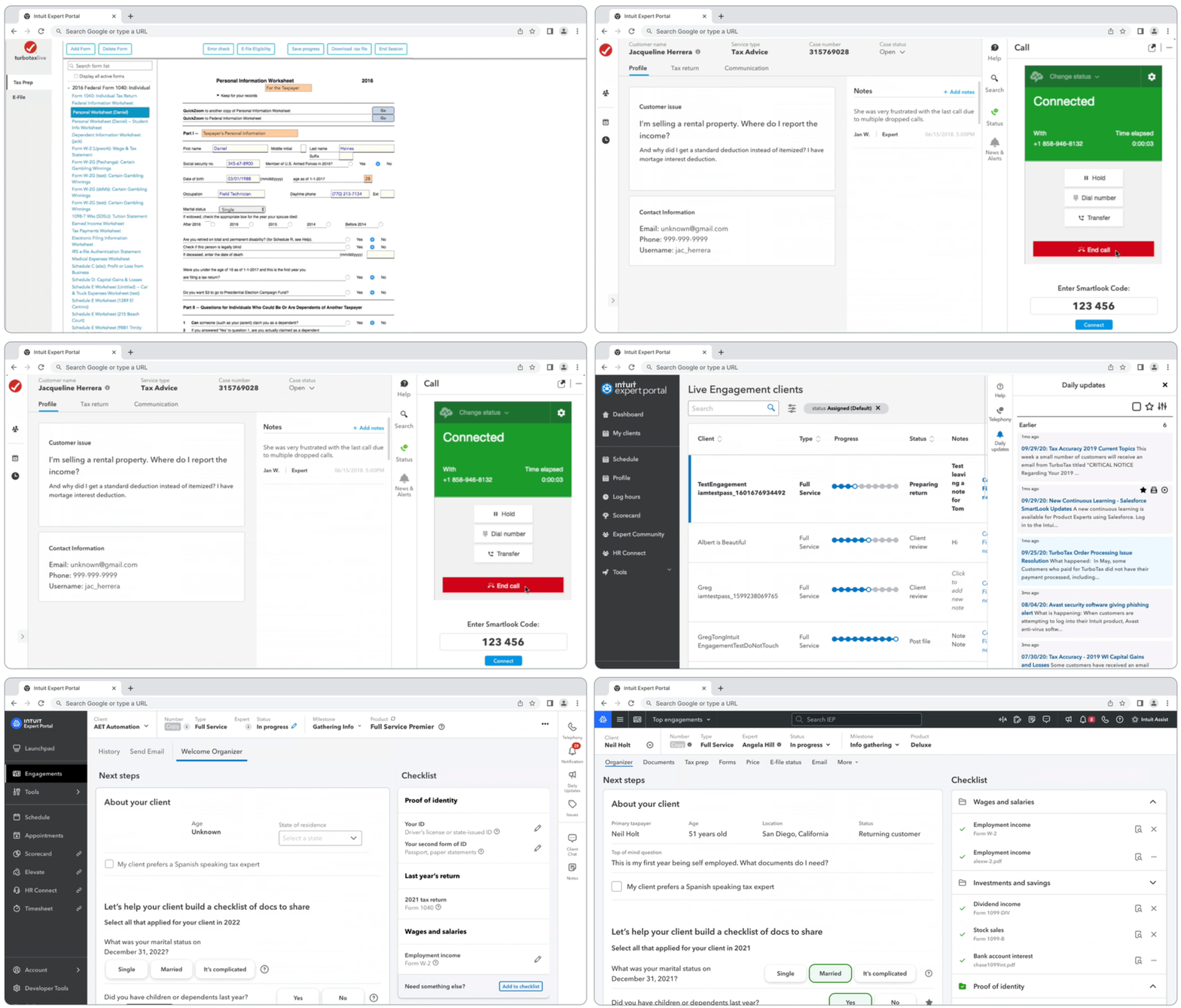
The legacy IEP screens for the year: Cluttered tab-and-panels
Define
Problem statement
I am...
a TurboTax expert
I am trying to…
move through a customer call quickly, with the right information and tools in front of me
But…
I am constantly switching between tabs, tools, and panels to find what I need
Because…
the platform is static and manual, and the tools I need aren't all in one place
Which makes me feel...
like the software is in my way instead of helping me serve the customer
Design principles
Four principles, built from the research, anchored every call I made on the shell:
Deliver an outcome, not only an output. Build interfaces that not only show, but also do.
Information is always at hand, but never in the way. Bring information to the expert when and where they need it.
We are the hammer, not the house. Every pixel is about empowering experts to confidently serve customers.
Design for imperfection. AI outputs won’t always be perfect, so experts always have a path to take control.
Ideate
Baseline: the third-peak shell
The starting point was a baseline third-peak iteration of the shell, mostly a layout rework. Two shifts set the stage:
Intuit Assist became a persistent Command Center.
It moved into the engagement and folded the scattered tabs into a single hub, the one starting point for all work in IEP and the point of interaction for the agentic co-pilot.
Utilities moved into pop-out windows.
Pulling them out of the right rail gave experts control of their canvas, including second-monitor use for tools like Telephony.
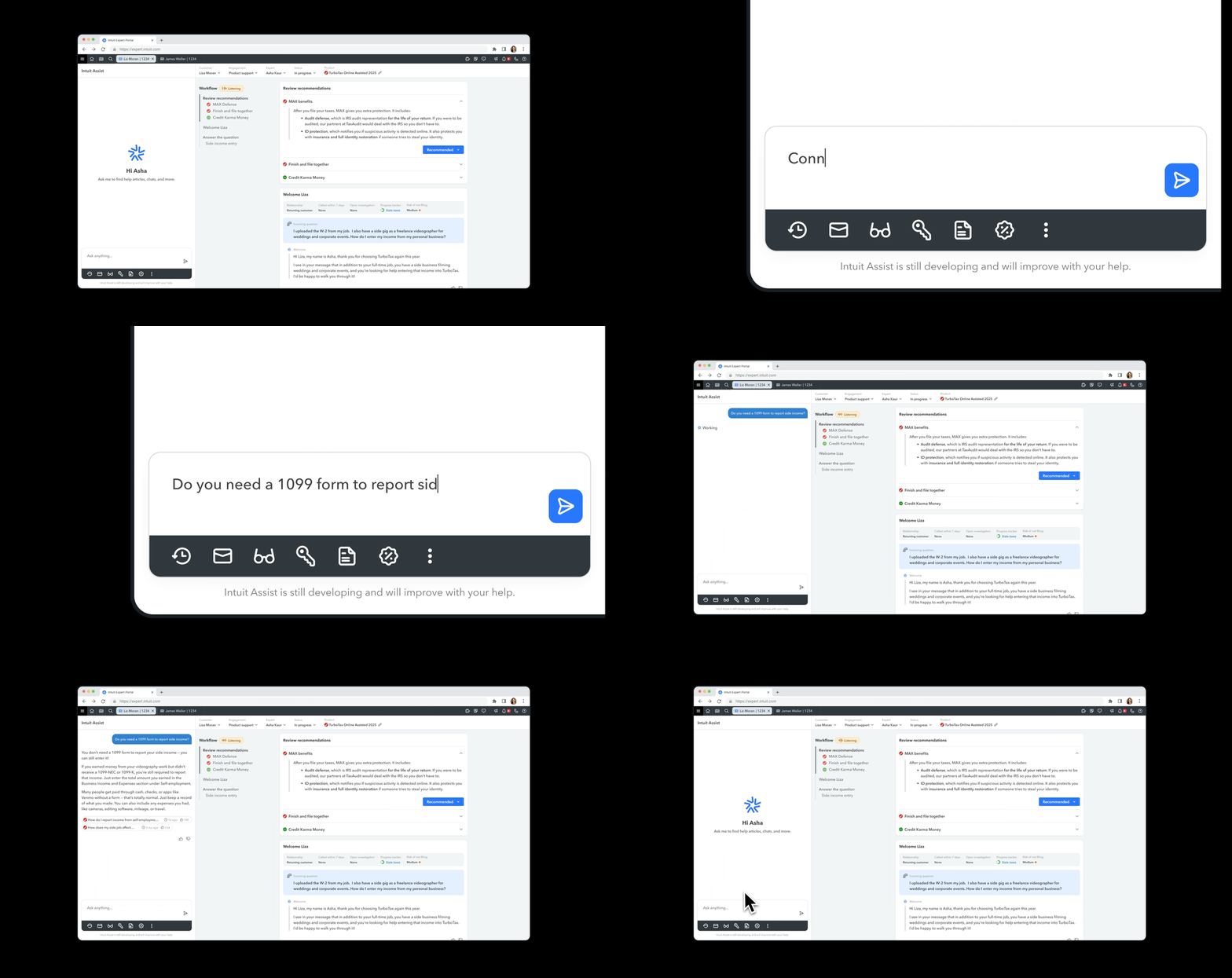
Example of baseline shifts: Intuit Assist
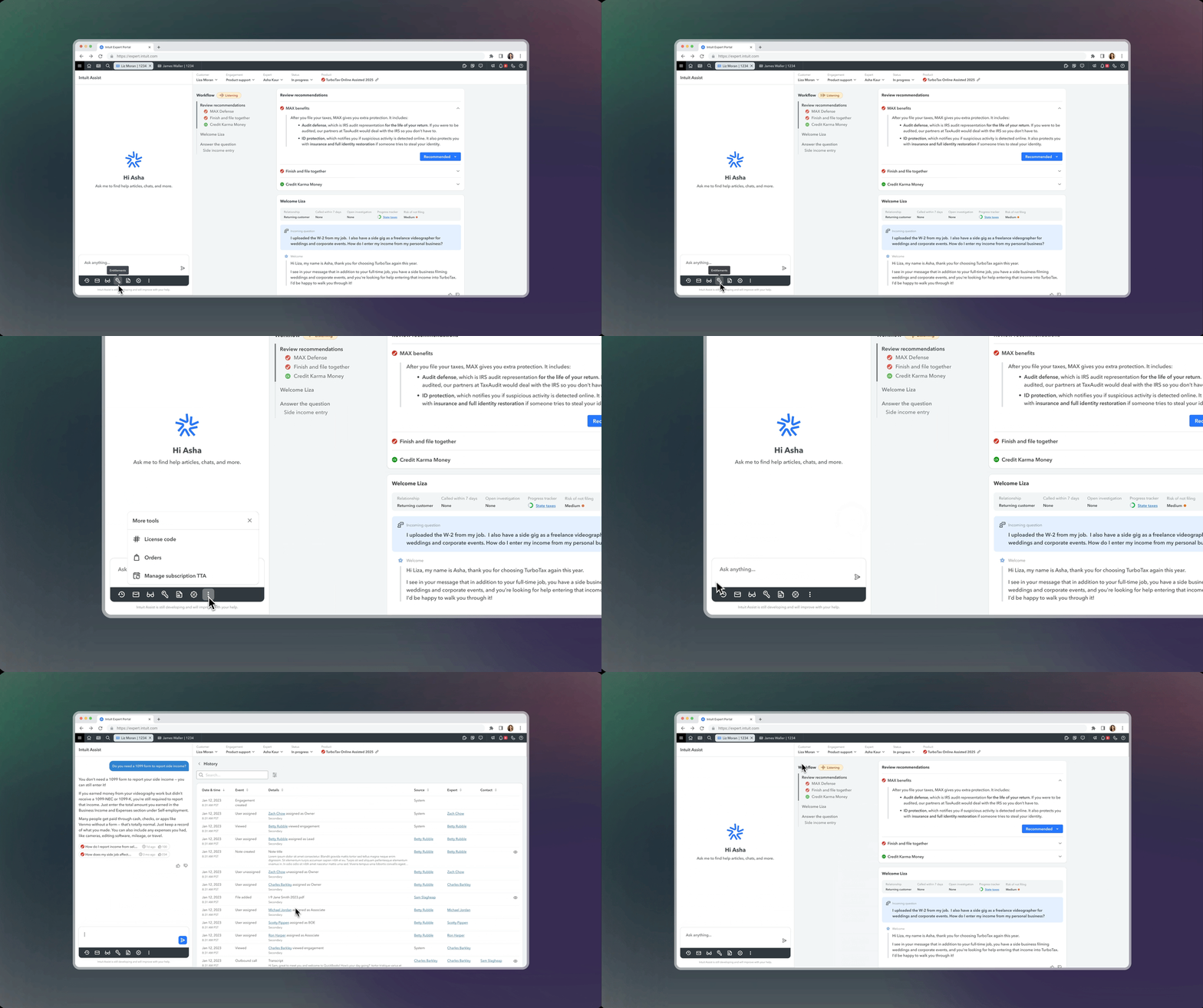
Example of baseline shifts: Command center
The plus: Dynamic Workflow Cards
On top of that baseline, my contribution was a provocation for how the workflow itself should behave. The legacy model assumed the expert did the navigating: open a tool, find the utility, come back, repeat. I flipped it. Instead of going out to a tool, the tool's action comes to the expert as a card, in the flow, triggered by what the customer is saying in real time.
Two capabilities make it new:
A dynamic Workflow / Table of Contents that builds itself as the call happens, guiding the expert through the right steps for that interaction instead of sitting as a fixed menu.
On-Contact Guidance card content surfaced from the live conversation, so the guidance and actions in each card match the moment at hand.
The cards follow a few rules:
Conversation-driven. Cards surface from the customer's real-time utterances, not from a fixed menu the expert has to remember.
Action, not just information. Each card carries a CTA the expert can take on the customer's behalf to move toward resolution, which is what opens the path to agentic actions.
One at a time. The expert handles one card, then moves to the next, so the workflow paces itself instead of dumping everything at once.
Never static. If the conversation changes direction, the cards reshape to match. The workflow follows the call, not a script.
Three scenarios
I designed the flow against three scenarios, varying how clearly the customer states their problem (utterance fidelity) and how accurate the AI guidance is in response. All three happen on the platform:
High-fidelity utterance, high-accuracy guidance. The clear path: customer is clear, the AI gets it right.
Low-fidelity utterance, low-accuracy guidance. Customer gives little to go on, so the guidance is weak.
High-fidelity utterance, low-accuracy guidance. Customer is clear but the AI still misses.
For time, this walkthrough focuses on the second.
Scenario 2: when guidance is weak
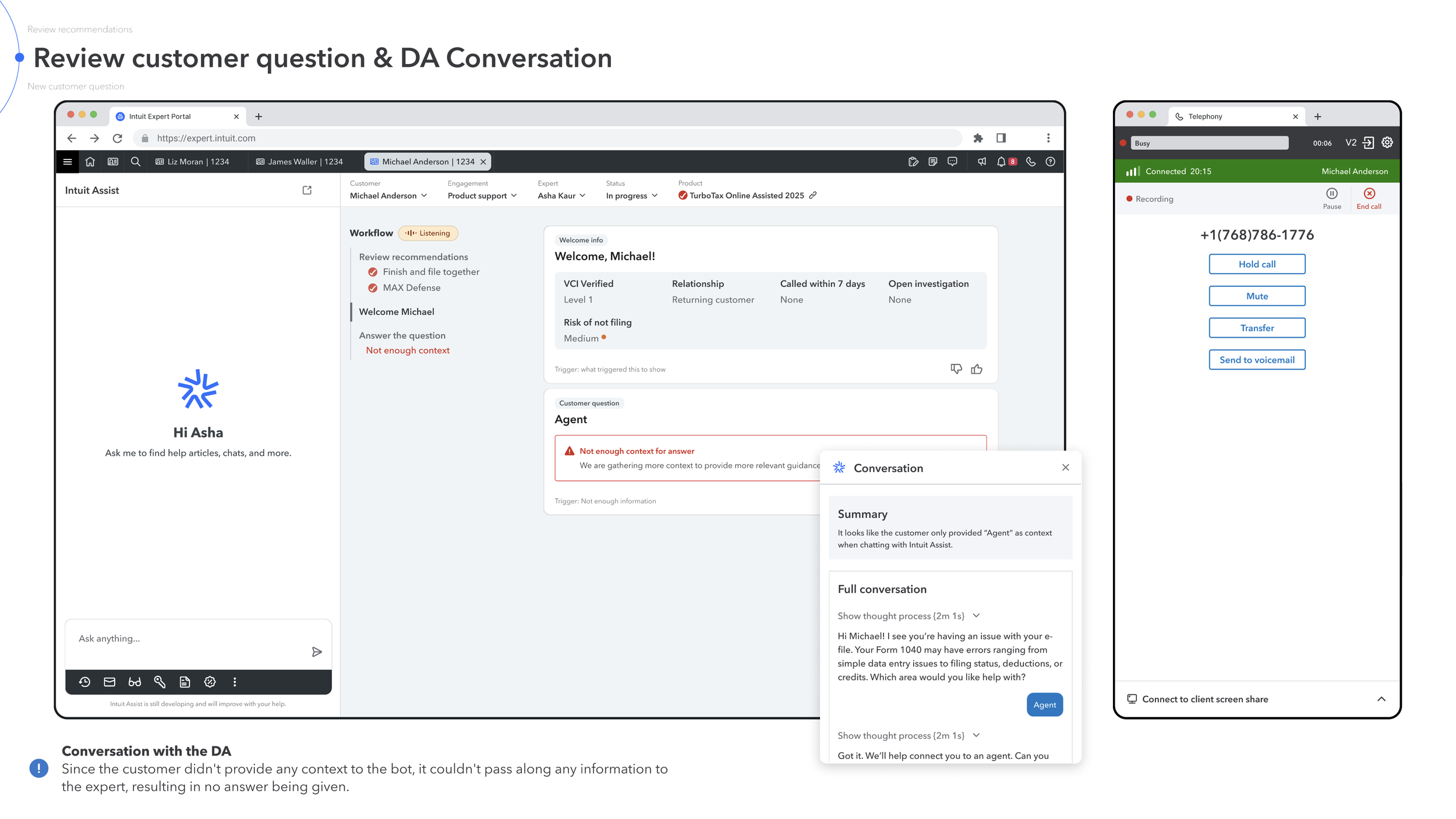
A customer calls but gives the bot almost no context, so there is nothing solid for the AI to work with. Instead of inventing an answer, the workflow surfaces an “Answer the question” card flagged in red: not enough context, gathering more, here is the conversation so far. The expert stays in control and keeps talking to the customer. When the customer then states the real problem, that they cannot find their 2025 estimated tax vouchers, a new guidance card surfaces with the actual answer and the workflow step updates from “not enough context” to the resolved question.
Every action from there lives in the same flow as a card: initiating the screen share, ending it, closing the engagement, approving the AI call notes. The expert never leaves to open a separate tool, and the left-rail workflow builds itself as the call unfolds, so the table of contents becomes a record of what actually happened. This is the “design for imperfection” principle in practice: be honest when the AI does not know, never block the expert, and let a better card replace a weak one as the conversation gives the system more to work with.
Why this was the bet
Putting everything into the workflow was an argument about what the platform could unlock: faster calls, far less swivel-chair, a foundation for agentic actions the system can take on the customer’s behalf, and a single model that scales cleanly across both Product Support and Domain experts. It was a provocation meant to stretch the roadmap, not a feature ready to ship, and it did move the conversation about where the platform should go.
Test
Design direction was validated through a dedicated research program running in parallel, with 15 rounds across five months covering both target-state concepts and third-peak readiness. Methods ranged from Follow-Me-Homes and in-depth interviews to Wizard-of-Oz role plays and concept testing across Product Support and Domain experts, including leads and managers.
A few signals shaped the iteration directly:
Co-pilot, not pilot. Experts welcome AI suggestions when they trust the accuracy, and take control earlier when they don’t. Expert agency had to be designed in, not assumed.
Guidance has a Goldilocks problem. Too much, too frequent, or off-target guidance gets ignored. One expert called persistent low-value guidance “the mother-in-law you want to get rid of.”
One size fits none. What works for one expert role or experience level doesn’t work for another, which is why control over the canvas mattered so much.
Implementation
I documented the interaction model and the shifts and presented them to cross-functional partners to align on scope and direction ahead of the build. The intro deck framed the demo goal, the scenarios, and what we needed partners to weigh in on, then walked through the design shifts before stepping into the live flow.
As the work moved toward development, I handed off the direction as I transitioned to another team. The platform carried forward into the 1st-peak build and continued iterating into 2026 under new owners.
Scenario provocation walkthrough
Results
My specific designs didn’t ship verbatim. They pushed the platform from its third-peak state toward the next iteration and fed the direction that later versions carried forward. AI Native IEP went on to ship as a program: a third-peak pilot ran with roughly 400 to 450 Product Support and Domain experts, and the platform later became the new baseline across these experts, retiring the legacy UI.
That program saw strong early adoption signals across both expert archetypes that moved onto it:
361 Index-to-Control in AI adoption among Domain experts in Full Service tax during the third-peak pilot.
140 Index-to-Control among Domain experts in TurboTax Live Assisted.
109 Index-to-Control among Product Support experts.
*Index-to-Control compares adoption against a control group; 100 is parity, so 361 means roughly 3.6x the control.
These are program outcomes from a large cross-functional and research-led effort, not metrics I owned. My contribution was the design leadership on the shell and the interaction shifts that helped shape the direction this work built on.
Future
AI Native IEP is a long arc, not a single release. The provocation I pushed, putting everything into the workflow as dynamic, conversation-driven cards, raised the questions worth designing against next: how to keep the cards trustworthy and well-paced so the flow doesn’t become the same overload in a new form, how far to take the CTAs toward true agentic actions the system performs on the customer’s behalf, and how to keep the model role-aware so it adapts across both Product Support and Domain experts.
The throughline stays the same. The system should bring the right action to the expert at the right moment, but the expert always controls the canvas and makes the final call.